Skip to content
9brains
Solutions · Apps

The app your team needs. Built from one sentence in the chat.

You describe what the app should do. 9brains builds it, tests it itself and publishes it. It shows live data from your systems, stores its own entries and grows with your requirements via chat.

Apps are included in the Business plan. See pricing

Example prompt

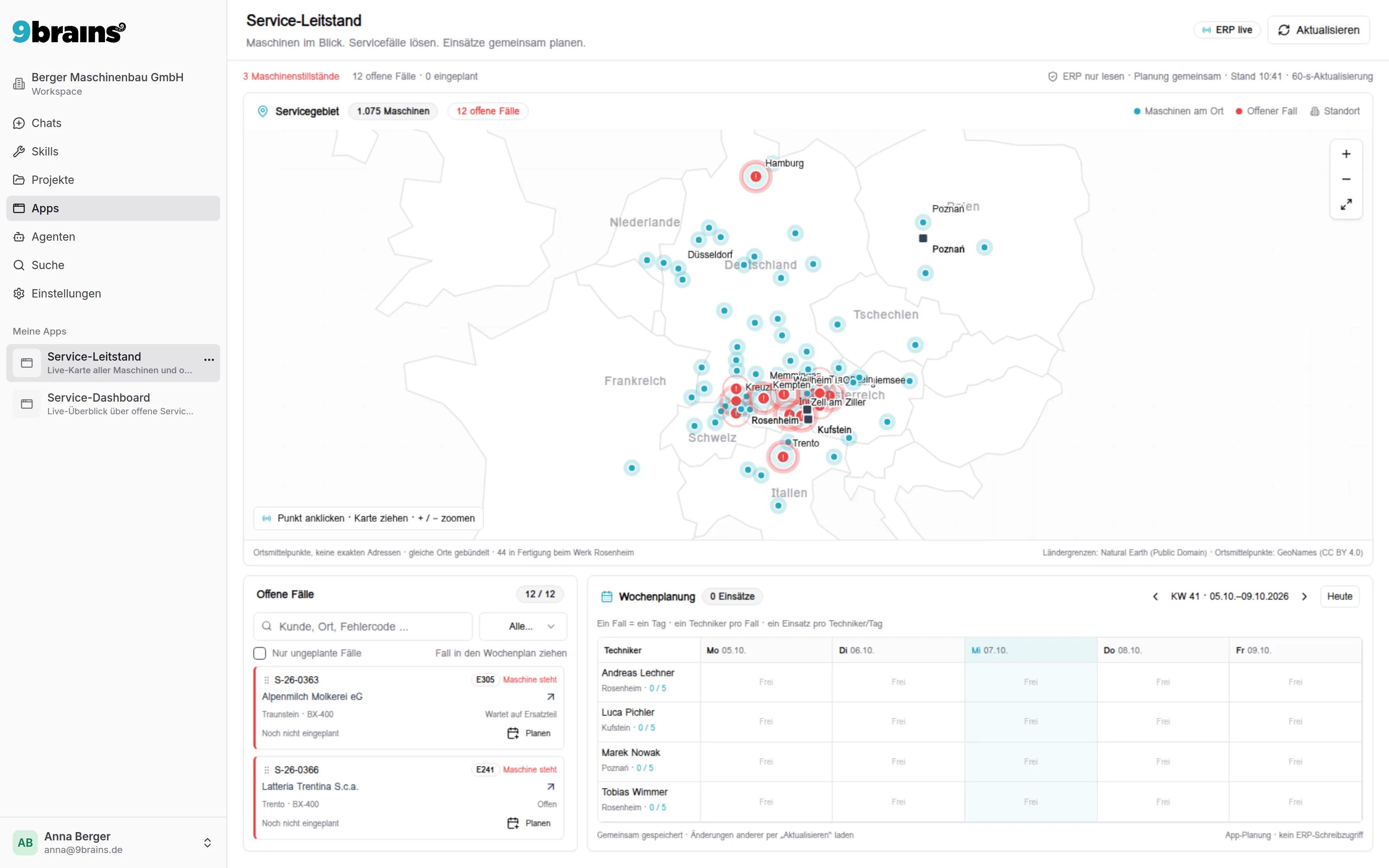
“Build me a service control center from our ERP database: a map with all machines and open cases, a click on a case shows the solution from the maintenance manual and the stock level, plus a weekly schedule for the service team.”

9brains app “Service control center”: map with all machines from the ERP and the open service cases, below it the list of open cases and a weekly schedule for the service team
One example of many: 9brains built the service control center from the video from a single prompt, live on the data from the ERP. See more examples

In the video

A custom app from one prompt

Anna describes in the chat what her service team needs. The result: a map with all machines from the ERP, a click on a case shows the solution from the maintenance manual including stock levels, plus a weekly schedule for the technicians.

Transcript of the video “9brains Apps: a service control center from one sentence”

In under a minute, 9brains turns one sentence in the chat into a service control center with live data from the ERP, solutions from the maintenance manual and shared scheduling. Real recordings from our demo workspace.

0:00 The tool your team really needs isn’t sold anywhere? Then just describe it.

0:05 One sentence in the chat is all it takes.

0:08 9brains reads your ERP and the maintenance manual, builds the app, and tests it itself.

0:14 And there it is: your service control center. Every machine, live from your ERP. In red: the open cases.

0:23 One click, and you see the fix from the manual and whether the spare part is in stock. And even that the manual doesn’t apply to this controller at all.

0:32 Need to schedule it? Just drag it onto a technician. Or say it in the chat.

0:37 Then share the app with your team, live on your data, securely hosted in Germany.

0:42 9brains Apps. You describe it, 9brains builds it.

What an app can do

Tailored to your task

An app is a small tool for a specific task in your team. You open it like any other page in 9brains, on your computer or on the go on your smartphone.

Live data from your systems

The app reads current figures directly from your integrations, for example your database (PostgreSQL, Microsoft SQL Server, Oracle), Microsoft 365, HubSpot, Jira or Lexware Office. You always see the current state, without exports and without copies.

Shared entries for the whole team

The app stores entries such as hours, notes or schedules centrally. Everyone you share it with sees the same current state, including what others have entered. Entries are kept when the app is developed further.

Tables, KPIs and charts

Bars, lines, pies and time series, sortable tables and KPIs at a glance. A click on a bar takes you to the details.

Use it via chat, too

Some things are quicker said than clicked: “Schedule Tobias on Thursday for the case in Prien.” 9brains writes the entry into the app, and the whole team sees it.

How an app is made

From one sentence to a finished app in four steps

  1. 01

    Describe

    Write in the chat who uses the app, what it should show and where the data comes from. A few sample rows help.

  2. 02

    Let it build and test

    9brains builds the app, opens it in the browser itself and keeps improving it until it runs without errors. You see every version as a preview next to the chat.

  3. 03

    Refine

    Another column, a different filter, one more chart? Say it in the chat. Your entries are kept.

  4. 04

    Share

    You share the app with individual colleagues or the whole team. When opening it for the first time, each person confirms once which accounts the app may use.

Examples

Where your own app pays off

Wherever someone keeps pulling the same figures together from several systems or a list keeps going around by email.

Time tracking with chat input

The team records hours per client and project in one central place. The fastest way is the chat: “I worked three hours for client Müller today”, and 9brains adds the entry. In the overview everyone sees what has been recorded and can also edit entries directly in the app.

Data: the app's own entries, the client list optionally live from your CRM.

How to start in the chat:

“Build me a time tracking app for our team with date, client, project, hours and activity. Everyone should be able to add and edit entries in the app, and I want to add hours via the chat as well. Plus a report per client and month.”

Company dashboard

Revenue, open items, sales pipeline and utilization from different systems on one screen. Management sees the current state every morning, and nobody has to copy figures from five tools into a spreadsheet anymore.

Data: live from your accounting (for example Lexware Office or sevdesk), your CRM (for example HubSpot) and your database.

How to start in the chat:

“Build me a dashboard for management: revenue for the current month and year from Lexware Office, open and overdue invoices, the HubSpot pipeline by stage and revenue over the last twelve months as a trend.”

Sales cockpit

Revenue, licenses and margin per customer, and below that the tasks currently due in sales, with the phone number ready to call.

Data: figures live from your database (PostgreSQL, Microsoft SQL Server or Oracle), open tasks including contacts live from your CRM, for example Brevo. The app stores notes on individual customers itself.

How to start in the chat:

“Build me a sales cockpit: revenue and margin per customer for the current year from our database, sortable, and below that all open sales tasks from Brevo with due date, contact and a clickable phone number.”

Development overview for everyone

What is done, what is in testing, what is in development and what comes next? The app reads it from Jira and shows it without ticket jargon. That way, colleagues without Jira can also see at a glance where the team stands.

Data: live from Jira. If you share your Jira account with the others, they don't need their own.

How to start in the chat:

“Build me an app that shows from our Jira project what was finished in the last two weeks, what is in testing, what is in development and what is coming up next. It's meant for colleagues who don't know Jira, so please no ticket jargon.”

You'll find more examples and all details on building, sharing and granting access in the documentation. Go to the docs: Apps

FAQ

Questions about apps

Do I need to know how to code to build an app?

No. You describe in plain language what the app should show and do. 9brains writes, tests and publishes the code. You request changes the same way, in the chat.

Where does the data in an app come from?

From your integrations in 9brains, such as databases, Microsoft 365, CRM, accounting or Jira, and from the app's own data storage. The app queries live data directly when it opens, so it always shows the current state.

Who can use an app?

At first, only you see a new app. Then you share it with individual people or the whole team. Whoever opens it confirms once which accounts the app may use, and the app only accesses those accounts.

How much do apps cost?

Apps are included in the Business plan (€35.00 per user/month with monthly billing or €29.17 per user/month with annual billing, plus VAT).

Which tool is your team missing?

Try 9brains free for 7 days or talk to us about which app would pay off most for you.

Try for free